
Understanding the Magic Mirror Monitor Technology
To the uninitiated, a magic mirror monitor seems like sorcery. In reality, it is a clever application of physics. The core of the technology lies in the “two-way” or “semi-transparent” mirror. Unlike a standard household mirror which has a thick, opaque silver backing, a magic mirror uses optical glass designed with specific light transmission properties.
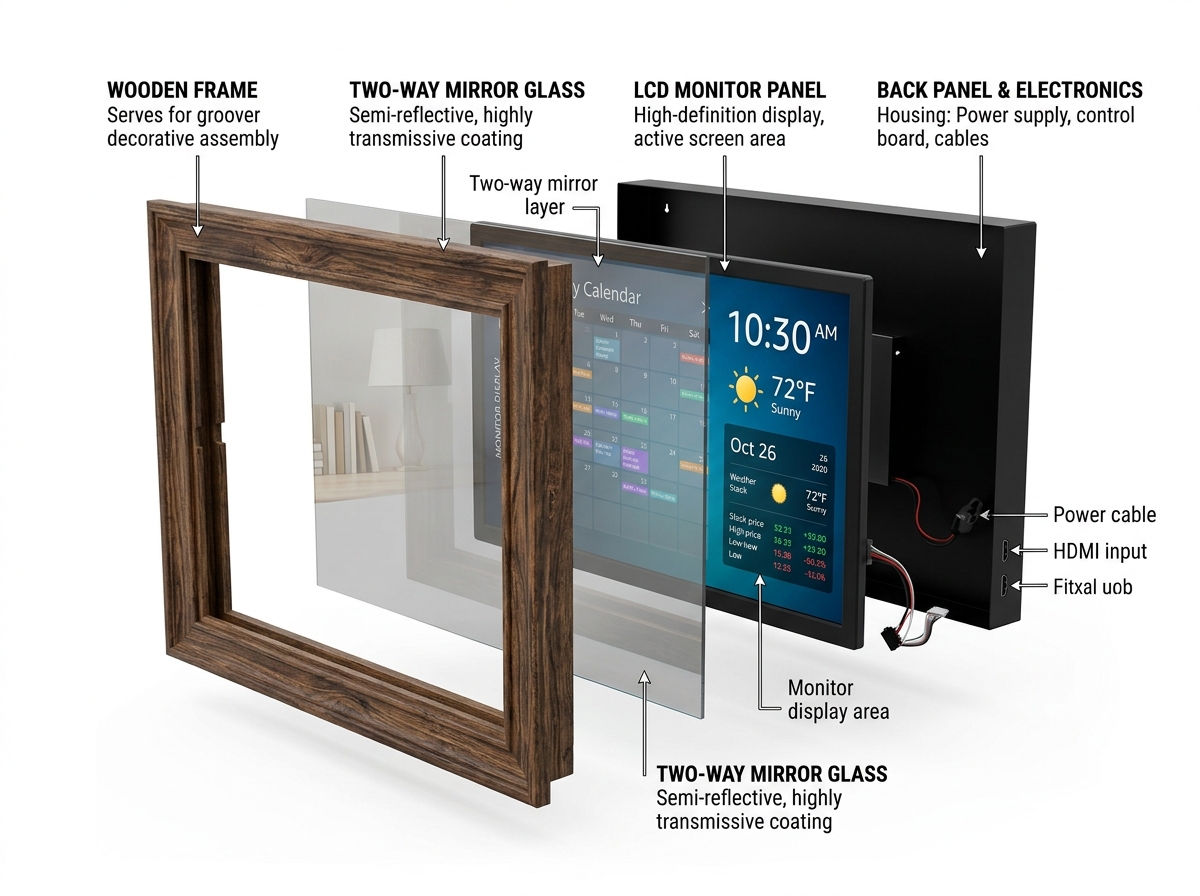
When we talk about Smart Mirror technology, we are referring to the marriage of this optical glass with a high-contrast display. The glass typically operates on a 70/30 reflect/transmit ratio. This means 70% of the light hitting the front is reflected (acting like a mirror), while 30% of the light from the monitor behind it passes through. This allows the white text of your calendar or weather widget to “pierce” through the reflection.
For professional environments, such as retail stores or hotel lobbies, “Mirrorvision” glass is often used. This commercial-grade glass is incredibly durable and designed to support 24/7 commercial use in high-traffic areas. When the display is turned off, the unit looks like a high-end, standard mirror. When powered on, it transforms into an interactive advertising or information hub. Whether you are using a DIY Raspberry Pi setup or a high-end Smart TV integration, the goal is the same: a seamless blend of reflection and data.
Key Specifications for a Magic Mirror Monitor
Not every screen is fit for a mirror. Because the glass blocks roughly 70% of the light coming from the display, you need a monitor that can fight back with high brightness.
- Brightness: This is measured in nits or cd/m². For a standard room, we recommend a monitor with at least 300 nits, though professional kits like the Vilros V4 often boast 500cd/m² for superior clarity.
- Contrast Ratio: The “blacker” the blacks on your monitor, the better. In a magic mirror, black pixels should emit as little light as possible so they blend into the mirror’s reflection.
- Resolution: While 1080p resolution is the sweet spot for most 24-inch builds, 4K displays are becoming popular for larger, 32-inch to 86-inch commercial installations where detail is paramount.
- Viewing Angles: Since you won’t always be standing directly in front of the mirror, an IPS panel is usually preferred over a TN panel to ensure the UI doesn’t disappear when viewed from the side.
You can find specialized components like the Waveshare Magic Mirror which are designed specifically with these specs in mind to ensure your “magic” doesn’t look washed out.
Professional vs. DIY Display Solutions
There is a significant divide between building a mirror for your bathroom and installing one in a flagship retail store.
Commercial-grade solutions are built for stamina. These panels feature advanced heat dissipation systems to prevent the electronics from overheating inside a sealed wooden frame. They are often “open-frame” designs, meaning they lack the bulky plastic outer shell found on consumer TVs, making them easier to flush-mount.
DIY/Residential panels, on the other hand, require a bit more “surgery.” Makers often look for monitors with a small bezel thickness and buttons that are easy to relocate. Whether you choose portrait orientation for a full-length dressing mirror or landscape mode for a bathroom vanity, the DIY route allows for maximum creativity at a fraction of the professional cost. For those looking for smaller, specialized displays, the Waveshare 13.3-inch Magic Mirror is an excellent middle ground between a raw panel and a finished product.
Top Monitor Picks for a Slim DIY Magic Mirror
The trend in the maker community is moving toward “ultrathin” builds. Gone are the days of 5-inch thick wooden boxes hanging precariously on the wall. By using portable OLED panels or ultra-thin LCDs, you can create a mirror that sits nearly flush with the wall.
| Feature | Portable OLED | Desktop LCD | Commercial Panel |
|---|---|---|---|
| Thickness | < 10mm | 40mm – 60mm | 50mm+ |
| Power | USB-C / 5V | AC Wall Plug | AC Wall Plug |
| Weight | Very Light | Moderate | Heavy |
| Price | $$$ | $ | $$$$ |
One of the best tricks we’ve found is using USB-C powered screens. Because they require less depth for power components, the entire mirror housing can be significantly slimmer. When selecting a monitor, look for side-mounted connectors. As noted in the expert teardown at MichaelTeeuw.nl – The Monitor, rear-facing ports are the enemy of a slim build, as the cables will stick out and force your mirror further away from the wall.
Best Budget-Friendly Magic Mirror Monitor Options
You don’t need a thousand-dollar budget to build a stunning magic mirror monitor. In fact, some of the best builds come from thrift store sourcing.
When hunting for second-hand hardware, look for 24-inch displays. This size is the “Goldilocks” zone—large enough to be useful, but small enough to find for $30 at a pawn shop. We highly recommend iiyama models or older Dell Ultrasharp units because their casings are notoriously easy to remove.
Essential Budget Checklist:
- HDMI or DVI Input: Avoid VGA-only monitors; the signal quality is poor and requires bulky adapters.
- 16:9 Aspect Ratio: This is the standard for magicmirror v2.34.0 software, making the UI layout much easier to manage.
- Internal USB Power: Some monitors have a USB port that can power your Raspberry Pi directly, reducing the number of cables coming out of your frame.
Sourcing the Right Two-Way Mirror Glass
The monitor is only half the battle; the glass is the other. You have three main choices:
- Two-Way Glass (Dielectric): This is the gold standard. It offers the best reflection and highest clarity. It is also the most expensive and can be heavy.
- Two-Way Acrylic: A great budget choice. It is shatter-resistant and lightweight. However, acrylic is prone to warping, which can create a “funhouse” effect if not mounted perfectly flat.
- Mirror Film: The cheapest option. You buy a standard piece of glass and apply a tinting film. While cost-effective, it is very difficult to apply without bubbles, and the transparency levels are often inconsistent.
For most home projects, we recommend a glass fascia with 11% to 30% light transmission. This ensures the display is visible without making the mirror look like a dark window when the screen is off.

Essential Hardware and Software for Your Build
Once you have your magic mirror monitor and glass, you need the “brain” to run it. The Raspberry Pi remains the undisputed king of this project.
- Raspberry Pi 3A+: Our top choice for slim builds. Its smaller footprint and lower profile make it easier to tuck behind a screen.
- Raspberry Pi 4: Better for mirrors that will also run voice assistants or face recognition, as it has more processing power.
- Nylon Fasteners: When mounting your Pi to the back of the monitor, use nylon nuts and bolts. Metal fasteners can cause shorts or even crack the acrylic if over-tightened.
- VHB Tape: “Very High Bond” tape is essential for securing the display panel to the frame without using bulky brackets.
Before you start plugging things in, check out our magic mirror coding guide to get your SD card prepped with the right OS.
Customizing Your Magic Mirror Monitor Interface
The beauty of a smart mirror is that it is uniquely yours. The MagicMirror² ecosystem is entirely open-source, meaning there are hundreds of community-made modules you can install with a few keystrokes.
You can customize magicmirror ui settings to change everything from font sizes to the color of your weather icons. If you aren’t comfortable with CSS styling, platforms like Dakboard offer a subscription-based, drag-and-drop interface that works beautifully in kiosk mode.
For those who want to dive deeper into the look and feel, we have guides on how to customize magicmirror ui 2 and customize magicmirror ui 3 to help you integrate custom APIs for things like stock tickers or smart home controls.
Advanced Features and Module Add-ons
If you want to move beyond a simple clock and calendar, the sky is the limit. Some makers add a camera for facial recognition, allowing the mirror to show “His” calendar when Dad stands in front of it and “Her” calendar for Mom.
Popular Add-ons:
- Motion Sensors: Use a PIR sensor so the monitor only turns on when someone enters the room. This saves power and extends the life of your display.
- MMM-MagicMover: A vital module if you are using an OLED screen. It slightly shifts the UI every few minutes to prevent OLED burn-in.
- Voice Control: Integrate Alexa or Google Assistant so you can ask your mirror to “read the news” while you brush your teeth.
Common Challenges and Real-World Applications
Building a magic mirror monitor isn’t without its hurdles. The most common issue is thickness constraints. Many builders forget that the HDMI cable and power brick need space. We suggest using 90-degree HDMI adapters to keep the profile slim.
Another challenge is frame construction. If you aren’t a master carpenter, using crown molding from a local hardware store is a fantastic “cheat.” It’s pre-decorated and creates a recessed area that perfectly hides the edge of your glass and monitor.
Real-World Magic
Beyond the home, magic mirrors are changing industries. In retail engagement, smart mirrors in changing rooms allow customers to request different sizes or see how an outfit looks in different lighting. In hospitality, hotels use them to provide concierge services without cluttering the room with paper menus.
One of the most impressive examples is the NFL Hall of Fame, where massive smart mirrors react to touch, allowing fans to explore player rosters on a surface that looks like a simple decorative mirror just moments before.

Frequently Asked Questions about Smart Mirrors
How do I choose the right brightness for my magic mirror monitor?
Look for the “Nits” or “cd/m²” rating in the monitor’s specs. For most indoor environments, 300 nits is the minimum. If your mirror will be in a very bright room with lots of windows, aim for 500 nits or higher to ensure the text remains legible against the sunlight.
What is the difference between two-way glass and acrylic?
Glass offers better optical clarity and won’t scratch easily, but it is heavy and expensive. Acrylic is lightweight, cheaper, and easier to cut at home, but it can “bow” or warp, which distorts the reflection. If you choose acrylic, ensure your frame supports it perfectly flat on all sides.
Can I build a magic mirror without a Raspberry Pi?
Yes! You can use an old Android tablet, a Windows “stick” PC, or even an old laptop. The Raspberry Pi is simply the most popular because of its small size and the massive community support for the MagicMirror² software.
Conclusion
At Foco Finanças, we believe that the best technology is the kind that blends into your life rather than cluttering it. The magic mirror monitor is the perfect example of this philosophy—turning a passive object like a mirror into a functional smart home hub.
Whether you are a seasoned maker or a beginner looking for your first project, the journey from a pile of parts to a “magic” reflection is incredibly rewarding. By choosing a slim monitor, the right glass, and a bit of open-source software, you can bring a piece of the future into your hallway today.
Ready to start? Explore our coding guides and join the community of makers redefining the modern home. Start your smart mirror journey today!
