
What to Know Before Your Smart Mirror App Download
Smart mirror app download options fall into two main categories — and knowing the difference saves you a lot of frustration.
Here are the most popular smart mirror apps you can download right now:
| App | Platform | Best For | Rating |
|---|---|---|---|
| SMART Mirror (SMART Tech) | iOS, Android, Windows | SMART Board screen mirroring | 3.5/5 (Android) |
| Smart Mirror by Smart Tools | Android | Phone-as-mirror utility | 4.1/5 |
| HD Smart Mirror | Android | Daily grooming, HD mirror | 4.2/5 |
| Mirror Feeds | iOS, Android | DIY smart mirror dashboards | N/A |
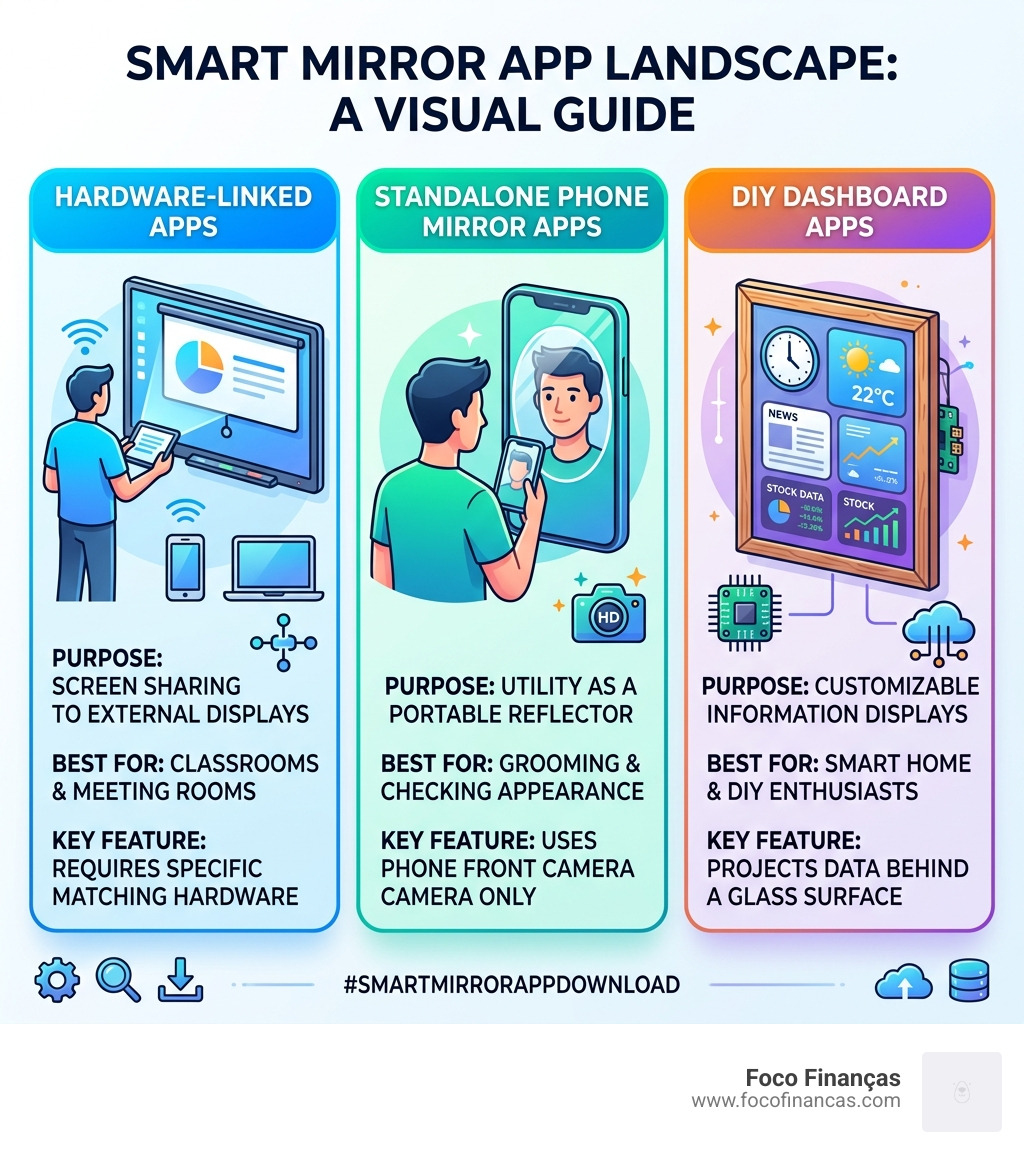
There are really two types of smart mirror apps:
- Hardware-linked apps — like the SMART Mirror app from SMART Technologies, designed to share your screen to a specific interactive display (such as a SMART Board in a classroom or meeting room)
- Standalone utility apps — like Smart Mirror by Smart Tools, which simply use your phone’s front camera as a portable mirror, no special hardware needed
For DIY smart mirror enthusiasts, there’s also a third category: dashboard apps like Mirror Feeds, which display news, weather, and stock data on a custom-built mirror display.
Picking the wrong type means downloading software that won’t do what you actually need. A teacher trying to project their phone onto a SMART Board needs something completely different from a homeowner building a Raspberry Pi magic mirror.
Understanding the Smart Mirror App Download Landscape
The digital transformation of our daily routines has turned the humble mirror into a high-tech interface. When we talk about a smart mirror app download, we are navigating a broad landscape that ranges from simple front-camera utilities to complex screen-sharing ecosystems.
Standalone utility apps essentially turn your mobile device into a high-definition reflection tool, perfect for grooming or checking your appearance on the go. On the other hand, hardware-linked apps facilitate seamless screen mirroring between your personal devices and large interactive displays. This is particularly common in educational environments where a teacher needs to project content from a tablet to a classroom board.
Before you hit that download button, it is vital to understand your specific needs. Are you looking to improve your morning routine, or are you trying to manage a professional presentation? For those interested in the technical side of how these programs function, our smart-mirror-program-complete-guide offers a deep dive into the software architecture behind these tools.
System requirements and hardware compatibility are the biggest hurdles users face. A mismatch between your app version and your display hardware often leads to the “black screen of death” or frequent disconnections.
Essential System Requirements for Mobile and Desktop
To ensure a smooth experience, your hardware must meet specific benchmarks. For the official SMART Mirror software (used with interactive boards), you generally need:
- iOS Users: iPhone or iPod touch running iOS 14.0 or later.
- Android Users: Versions ranging from Android 4.x up to 12.x depending on the specific utility app.
- Windows Users: Windows 10 or later is the standard requirement for the desktop client.
- Hardware Receivers: If you are connecting to a SMART Board, it must have iQ embedded computing and a SMART Mirror receiver version 4.32.2 or higher.
Network configuration is also a silent dealbreaker. Both the sending device and the receiving display must be on a compatible network to “see” each other. If you are building your own setup from scratch, you might want to look at our smart-mirror-javascript-setup to understand how web-based mirror interfaces are constructed.
Best Professional and Educational Mirroring Software
In professional and educational settings, the smart mirror app download of choice is almost always the official SMART Mirror app. This software is designed specifically for classroom collaboration, allowing multiple students or presenters to share their screens simultaneously to a SMART Board.
The connection process is designed to be “teacher-proof.” You simply open the app, enter a connection code displayed on the board, and your screen appears. This eliminates the need for messy HDMI cables or complex login credentials.
| Feature | Professional Mirroring (SMART Tech) | Personal Utility Apps (Smart Tools) |
|---|---|---|
| Primary Goal | Screen Sharing / Collaboration | Personal Reflection / Grooming |
| Hardware Required | SMART Board with iQ | Smartphone Front Camera |
| Input Method | Connection Code | Direct App Launch |
| Special Features | Multitouch, Screen Freeze | Zoom, Brightness, 3D View |
For those managing large-scale deployments in schools, understanding the smart-mirror-modules-installation process is key to ensuring every classroom is ready for the first bell.
SMART Mirror App Download for Windows and iOS
The latest versions of the SMART Mirror app have addressed several historical “pain points.” For instance, version 2.49 (released in late 2024/early 2025) resolved critical screen freeze issues that plagued earlier iterations.
For Windows administrators, the smart mirror app download comes as an EXE file. While there is no native MSI version, you can perform a silent install using the command /SP- /VERYSILENT /SUPPRESSMSGBOXES. This is a lifesaver for IT departments needing to push the software to hundreds of laptops at once.
You can find the official Downloads – SMART Mirror link here to ensure you are getting the verified, secure version of the software. Once installed, you can even customize-magicmirror-ui settings to better fit the branding or functional needs of your institution.
Top Utility Apps to Turn Your Phone into a Smart Mirror
If you aren’t in a classroom, your smart mirror app download is likely a utility app meant to replace a physical mirror. The leader in this space is Smart Tools co., whose “Smart Mirror” app has surpassed 10 million downloads.
These apps are surprisingly sophisticated. They don’t just show your reflection; they use software processing to enhance the image. For example, the HD Mirror Mode provides a much clearer image than your standard camera app because it optimizes the exposure specifically for faces.
One of the coolest features found in these apps is the 3D View. This allows you to “record” your profile and rotate the image, effectively letting you see the back of your head or the side of your face—something a standard glass mirror can’t do without a second mirror. If you’re interested in how these features are programmed, check out our magic-mirror-coding-guide.
Features to Look for Before Your Smart Mirror App Download
Not all mirror apps are created equal. When searching for an HD Smart Mirror, look for these specific features:
- Screen Freeze: This allows you to “pause” the reflection. It’s incredibly helpful if you’re trying to check a detail behind your ear or see a specific angle without holding your arm at a weird position.
- Digital Zoom: Most top-rated apps offer up to 5x zoom, which is perfect for precision tasks like applying eyeliner or shaving.
- Border Light: This turns the edges of your phone screen into a bright white light, acting like a ring light to illuminate your face in dark environments.
- Exposure Control: This helps you adjust the brightness if you are outdoors in harsh sunlight or in a dimly lit bathroom.
Managing these features effectively requires a bit of a learning curve, which we cover in our smart-mirror-javascript-setup-2 guide for those looking to build their own custom interfaces.
Advanced Dashboard Apps for Custom DIY Mirrors
For the tech-savvy crowd, a smart mirror app download isn’t about the phone—it’s about the wall. DIY Smart Mirrors (often called Magic Mirrors) use a two-way mirror with a monitor behind it. The “app” in this case is a dashboard that displays information.
Mirror Feeds is a prime example of this software. It transforms a display into a hub of real-time information. Key features include:
- RSS Integration: Automatically scroll through news headlines from your favorite sources.
- Stock Monitoring: Track up to five stocks simultaneously.
- Weather and Currency: Get local forecasts and foreign exchange rates at a glance.
Setting up these dashboards often involves working with modules. You can learn more about this in our guides on smart-mirror-modules-installation-2 and how to customize-magicmirror-ui-2. The goal is to create a minimalist, non-intrusive UI that only gives you the info you need while you brush your teeth.
Troubleshooting and Privacy for Smart Mirror Software
No software is perfect. The most common complaint with the SMART Mirror app is frequent disconnection. Users often report that the connection drops every 60 seconds, requiring a restart. This is usually due to network congestion or an outdated receiver on the SMART Board. Always ensure your board is running at least version 4.32.2.
If you are using a third-party site for your smart mirror app download, such as Download Mirror – Smart Mirror for Android free, always verify the APK through a service like VirusTotal. While many of these tools are safe, “free” apps can sometimes bundle unwanted adware.
Privacy is a major concern when an app requests access to your camera. The good news? Most reputable developers, like SMART Tech and Smart Tools co., state they do not collect or share user data. However, some apps may collect “app activity” or “location data” for analytics. Always check the privacy policy in the app store before installing. For those worried about security, learning to customize-magicmirror-ui-3 can help you build a private, local-only dashboard that never sends data to the cloud.
Frequently Asked Questions about Smart Mirror Apps
How do I connect my phone to a SMART Board?
To connect, ensure both your phone and the SMART Board are on the same network. Open the SMART Mirror app on your device and enter the 6-digit connection code shown on the board’s iQ home screen. Ensure your board’s receiver is updated to at least version 4.32.2 for the best stability.
Are smart mirror apps safe to use?
Generally, yes. Apps like Smart Mirror 1.5.10 use data encryption in transit. Most top-rated utility apps do not store your photos or video feeds on their servers; the camera processing happens locally on your device.
Can I use these apps on a DIY Magic Mirror?
Yes, but the process is different. Instead of a mobile app, you will likely use a Raspberry Pi running a dashboard like Mirror Feeds or a custom-coded solution. These allow for extensive layout customization, including RSS feeds and weather widgets.
Conclusion
Whether you are a teacher looking to revolutionize your classroom or a DIY enthusiast building the home of the future, the right smart mirror app download is out there. From the professional-grade SMART Mirror for Windows and iOS to the highly-rated utility apps from Smart Tools co., these programs turn our screens into functional, reflective tools.
At Foco Finanças, we believe that mastering your digital lifestyle starts with choosing the right tools. By understanding system requirements, prioritizing privacy, and knowing which features matter most, you can turn any display into a “smart” one.
For more in-depth tutorials on building and optimizing your digital displays, explore our More information on smart mirror setups page. Happy mirroring!
