
What It Really Takes to Build a Magic Mirror
Build a magic mirror and you’ll create one of the most satisfying DIY projects in the maker world – a regular-looking mirror that secretly displays the time, weather, calendar, and more, all floating in your reflection.
Here’s the quick version of what’s involved:
- Get a Raspberry Pi (Pi 4 recommended) and a compatible monitor
- Buy or source a two-way mirror panel – acrylic for budget builds, glass for permanent installs
- Install Raspberry Pi OS and the free, open-source MagicMirror 2 software
- Build or repurpose a frame to house the monitor and mirror together
- Set up PM2 so your mirror auto-starts and recovers from crashes
- Customize your modules – clock, weather, calendar, news, and hundreds more
The total cost can range from under $50 (thrift store parts) to $300+ (custom glass and premium hardware).
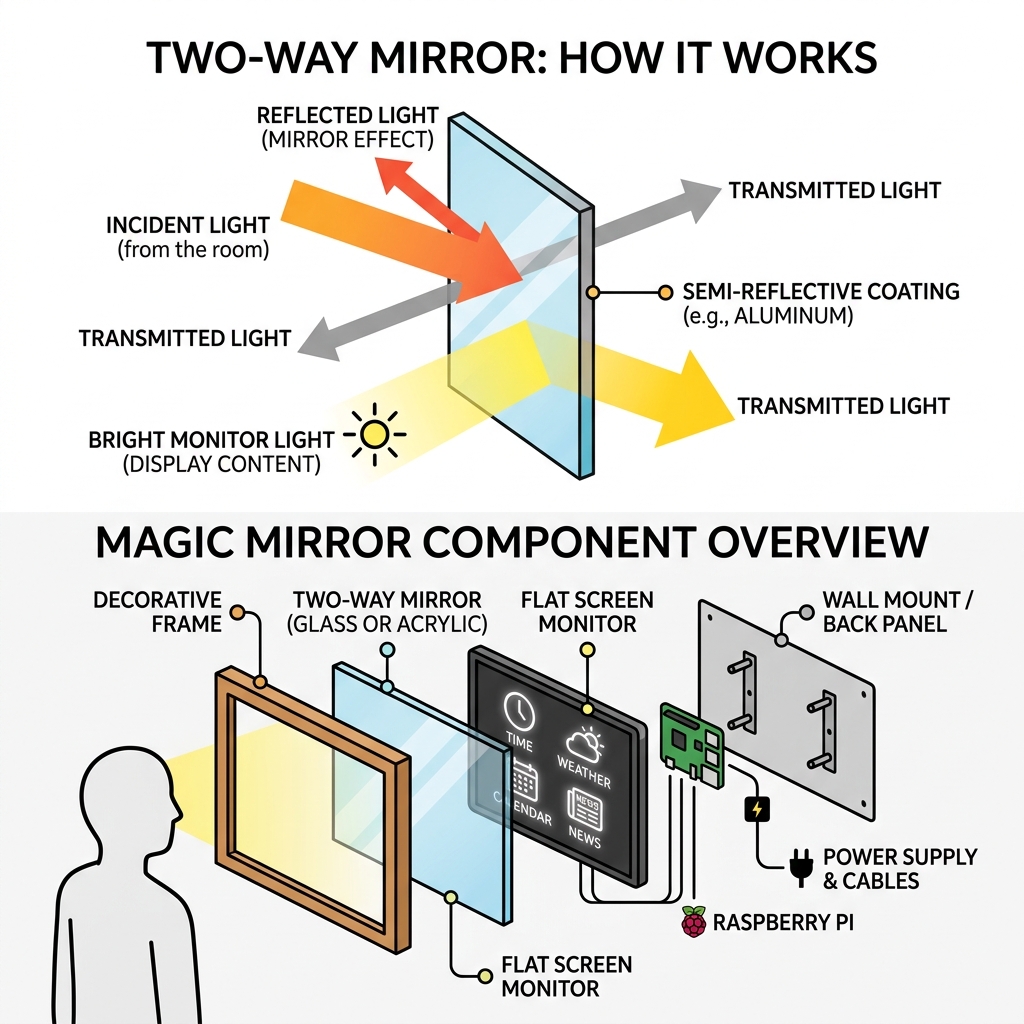
The concept is simple: a monitor sits behind a piece of semi-reflective glass. When the screen is bright enough, its content shines through the glass. When it’s off, you just see a normal mirror. No magic – just physics.
MagicMirror 2 is the software that powers most of these builds. It’s free, open-source, and was even voted the #1 project by the Raspberry Pi community in The MagPi magazine’s Top 50 celebration issue. Hundreds of community-built modules mean you can show almost anything on your mirror without writing a single line of code.
This guide walks you through every step – hardware, software, frame, and beyond.
Essential Hardware to Build a Magic Mirror
Before we dive into the code, we need to gather our physical components. The “magic” in a smart mirror is actually a clever play on light. We use a two-way mirror (also known as observation glass), which is semi-reflective and semi-transparent. When you place a monitor behind it, the bright white text from the screen passes through the glass, while the black areas of the screen remain dark, allowing the glass to act as a mirror.
To build a magic mirror, you will need:
- A Monitor/Display: This provides the “smarts.” You can use an old computer monitor, a repurposed laptop screen with a controller board, or even a small official Raspberry Pi touchscreen.
- A Raspberry Pi: The “brain” of the operation.
- MicroSD Card: At least 16GB (Class 10) to hold the OS and software.
- Power Supply: A high-quality power adapter (5V 3A for Pi 4) is crucial. Many “mysterious” crashes are actually caused by undervoltage.
- HDMI Cable: To connect the Pi to your monitor.
- The Two-Way Mirror: This is the most critical aesthetic choice.

Comparing Two-Way Glass vs. Acrylic Mirror
One of the first big decisions you’ll face is choosing the mirror material. For a deep dive into this choice, check out The ultimate guide to building a two-way smart mirror.
| Feature | Two-Way Glass | Acrylic Mirror |
|---|---|---|
| Visual Quality | Exceptional; no distortion | Good, but can have “funhouse” warping |
| Durability | Hard to scratch; easy to clean | Scratches very easily |
| Weight | Very heavy (approx. 30 lbs for a 30″ sheet) | Lightweight |
| Cost | Expensive ($150 – $250+) | Affordable ($20 – $50) |
| Ease of Use | Must be custom-cut by pros | Can be cut at home with a saw |
If you are a beginner, we recommend starting with acrylic or even a two-way mirror film applied to glass. However, for a permanent living room fixture, custom-cut 1/4-inch glass is the gold standard.
Choosing the Best Raspberry Pi for Your Build
While the MagicMirror 2 software can technically run on older hardware, your choice of Raspberry Pi will dictate how smooth the experience is.
- Raspberry Pi 4 (2GB or 4GB): This is our top recommendation. It handles modern web technologies (Electron/Node.js) with ease and supports dual monitors if you’re feeling ambitious.
- Raspberry Pi 3B+: Still a very capable choice and slightly cheaper. It’s perfect for standard builds without heavy video modules.
- Raspberry Pi 3A+: Great for “super-slim” builds where space is at a premium, though it has fewer USB ports.
- Avoid: The Raspberry Pi Zero (1st Gen) and Pi 1. They struggle to run the modern Chromium-based interface smoothly.
For more details on why we love this hardware, see Why Raspberry Pi is perfect for your smart mirror. Don’t forget to add heat sinks or a small fan hat; these mirrors live in enclosed wooden boxes where heat can build up quickly!
Selecting a High-Visibility Monitor
Not all monitors are created equal when hidden behind glass. To ensure your calendar doesn’t look like a ghost, look for these specs:
- Brightness: Aim for at least 300 nits (cd/m2). Anything lower might be hard to read in a well-lit room.
- Panel Type: IPS panels are generally better because they have wider viewing angles. You don’t want the “magic” to disappear just because you’re looking at the mirror from the side.
- The Bezel: To keep the mirror slim, you’ll likely want to “de-bezel” the monitor – removing the plastic outer casing to reveal the thin metal frame of the LCD panel itself.
Step-by-Step Software Installation and Configuration
Once your hardware is sitting on the workbench, it’s time to bring it to life. We’ll be using MagicMirror 2, the industry standard for these projects.
How to Build a Magic Mirror Software Environment
First, install the latest Raspberry Pi OS (64-bit is recommended for Pi 4) using the Raspberry Pi Imager. We suggest using the desktop version so you can easily test the mirror’s layout.
Once booted, open your terminal. While there used to be a simple one-line installer, the community now recommends a manual installation to ensure all dependencies are handled correctly. You can find the full breakdown in our Setting up your smart mirror: a complete guide.
The basic flow looks like this:
- Install Node.js: The engine that runs the mirror.
- Clone the Repository:
git clone https://github.com/MichMich/MagicMirror - Install Dependencies: Enter the folder and run
npm install. - Configure: Copy the sample config file:
cp config/config.js.sample config/config.js.
Now, you can run npm start to see the default modules: a clock, a calendar, news feeds, and a “compliment” module that tells you how great you look (which is always nice in the morning). For those who want to tweak the code further, our Magic Mirror coding guide covers everything from CSS styling to API integrations.
Automating Your Mirror with PM2
You don’t want to plug in a keyboard every time the power flickers. To make your mirror a true appliance, we use PM2, a process manager.
PM2 ensures that MagicMirror 2 starts automatically as soon as the Pi boots up. More importantly, if the software crashes, PM2 will instantly restart it. This creates a “set it and forget it” experience. Setting this up involves creating a small shell script and telling PM2 to “save” the current process state. You can learn the specific commands in our guide on Building a smart mirror with Raspberry Pi.
Designing the Frame and Final Assembly
Now for the woodworking! The frame isn’t just for looks; it holds the heavy glass and the monitor in a tight “sandwich” to prevent light bleed.
Pro Tip: Use black foam weatherstripping tape between the monitor bezel and the mirror. This ensures no light leaks out from the sides of the screen, which would ruin the illusion of floating text.
If you aren’t a master carpenter, don’t worry. Many builders use the IKEA RIBBA or HOVSTA frames. They are deep enough to house a slim monitor and a Raspberry Pi. If you are building a custom wooden frame, ensure you drill ventilation holes at the top and bottom to allow for natural convection cooling.
For a detailed walkthrough on assembly, visit DIY smart mirror: a step-by-step guide.
Advanced Features to Build a Magic Mirror
Once the basics are done, you can start adding “Level 2” features:
- PIR Motion Sensor: Why keep the screen on if no one is in the room? A $3 PIR sensor can wake the monitor when you walk by and turn it off when you leave, saving energy and extending the life of your monitor.
- Home Assistant Integration: You can display your smart home status – lights, locks, and temperatures – directly on the mirror. Check out this guide to Home Assistant integration for more.
- Voice Control: Add a USB microphone and use modules like MMM-GoogleAssistant to talk to your mirror.
- Facial Recognition: Using a Raspberry Pi camera, the mirror can show your specific calendar when you stand in front of it, and your partner’s calendar when they do.
To make the mirror truly yours, you’ll want to Customize MagicMirror UI to match your home’s aesthetic.
Frequently Asked Questions about Magic Mirrors
How much does it cost to build a magic mirror?
The cost is entirely up to your “scavenging” skills!
- The Budget Build ($50 – $80): Use a $10 monitor from a thrift store, a $5 IKEA frame, a Raspberry Pi 3 (used), and two-way mirror film.
- The Mid-Range Build ($150 – $200): A new 24-inch monitor, Raspberry Pi 4, custom wood frame, and a high-quality acrylic two-way mirror.
- The Premium Build ($400+): A 4K display, Raspberry Pi 5, professional custom-cut 1/4″ two-way glass, and advanced sensors.
Can I use a regular mirror with two-way film?
No. A regular mirror is opaque; light cannot pass through the back. You must use a two-way mirror or a piece of clear glass/acrylic with two-way film applied to it. Applying film can be tricky (bubbles are the enemy!), so take your time and use plenty of soapy water during application.
Is it safe to leave the mirror running 24/7?
Yes, provided you have addressed heat management. Electronics inside a sealed wooden box can get hot. Ensure there are air vents. Additionally, using a PIR sensor to turn the monitor off when not in use significantly reduces fire risk and power consumption. Always use a high-quality, grounded power strip inside the frame.
Conclusion
At Foco Finanças, we believe that technology should work for you, not the other way around. Learning how to build a magic mirror is more than just a weekend project; it’s about creating a personalized dashboard that streamlines your morning routine and brings a touch of the future into your home.
Whether you’re building a tiny desk mirror or a full-length dressing mirror, the community at the MagicMirror 2 forums is always there to help. Ready to get started? Check out our Beginners guide to building a smart mirror and start your DIY journey today!
