
What Is Raspberry Pi Mirror Software (and Which Should You Use)?
Raspberry pi mirror software is the program that runs on a Raspberry Pi computer to display information — like weather, time, and calendar events — on a screen hidden behind two-way mirror glass.
Here are the most popular options to know about:
| Software | Best For | Cost |
|---|---|---|
| MagicMirror² | Full customization, modules, community support | Free |
| ReflectOS | Beginner-friendly, web-based setup, minimalist look | Free |
| RPiPlay | Mirroring your iPhone or Mac screen via AirPlay | Free |
Most DIY builders start with MagicMirror² — it was voted #1 in the MagPi Top 50 by the Raspberry Pi community and has hundreds of ready-made modules.
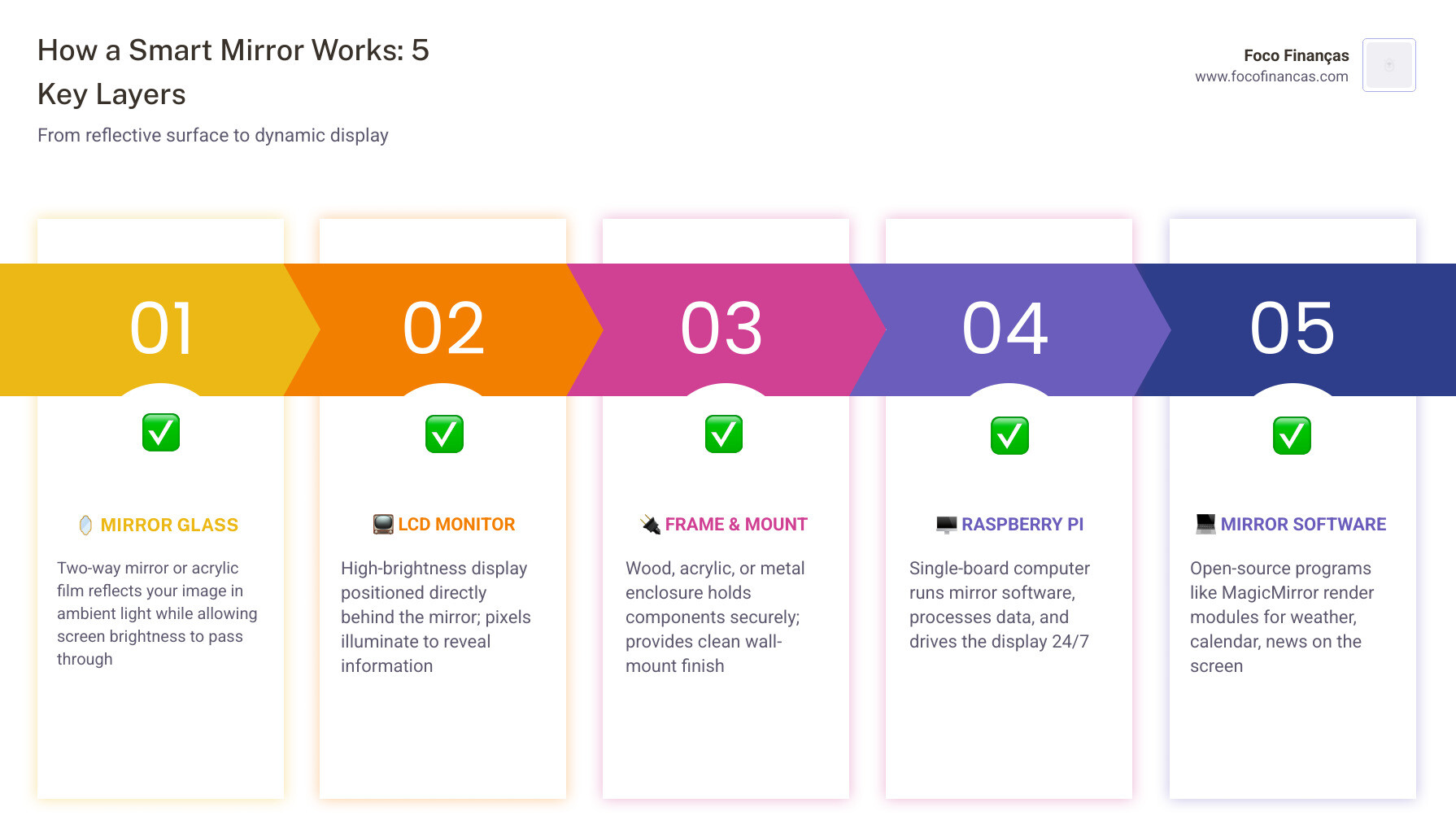
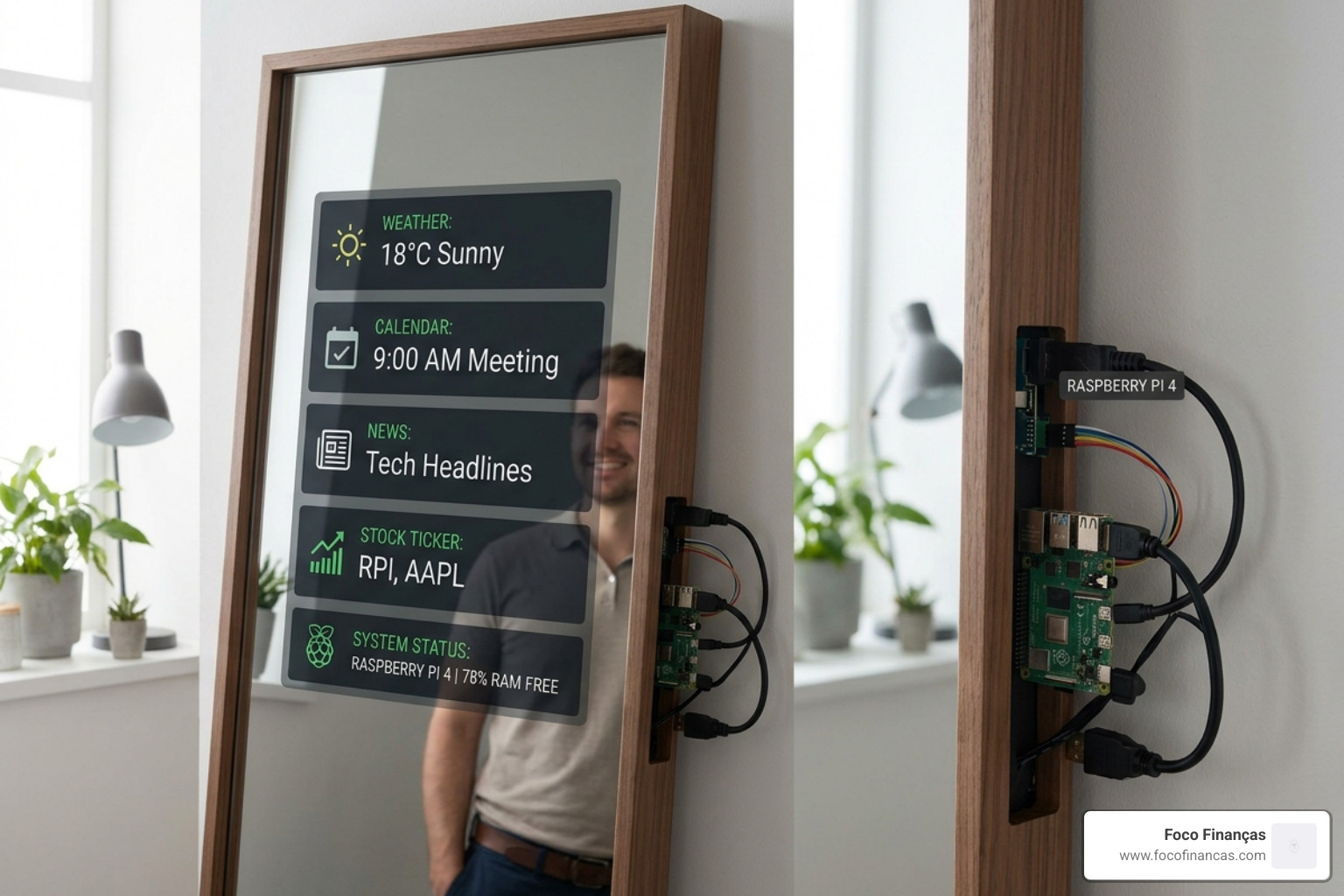
So how does the whole thing actually work? A smart mirror is simpler than it sounds. A regular display sits behind a sheet of two-way mirror glass or acrylic. The glass reflects like a normal mirror in bright light, but wherever the screen glows underneath, that light punches through — so you see your reflection and the digital display at the same time.
The Raspberry Pi is the brain sitting behind the glass. It runs the mirror software, connects to the internet, and drives everything you see on screen.
The tricky part isn’t the hardware. It’s picking the right software and setting it up so it actually runs reliably day after day — without you having to babysit it.
That’s exactly what this guide covers.
Top Raspberry Pi Mirror Software Options for Your Project
When we dive into DIY smart mirrors, we aren’t just looking for a pretty face; we need a robust engine. The raspberry pi mirror software you choose dictates how much control you have, how easy it is to set up, and what kind of “smart” features you can actually use.
Most of these options are open-source, meaning they are free to use and built by a community of enthusiasts who just want cool tech in their bathrooms and hallways. Whether you want a modular design that you can tinker with for weeks or a “set it and forget it” minimalist aesthetic, there is a flavor for you.
If you are wondering why we use this specific hardware, check out our guide on why-raspberry-pi-is-perfect-for-your-smart-mirror.
MagicMirror²: The Gold Standard for Raspberry Pi Mirror Software
If there is a king of the hill in this niche, it is undoubtedly MagicMirror². This software is so well-regarded that it was voted the number one project in the MagPi Top 50 by the Raspberry Pi community. It’s built on a powerful framework using Node.js and Electron, which essentially means it runs like a dedicated web browser that only shows your mirror’s interface.
What makes MagicMirror² the “Gold Standard” is its modularity. You aren’t stuck with what comes in the box. There are hundreds of community-created modules available on GitHub. Want to see your Tesla’s battery level? There’s a module for that. Want a daily cat fact? There’s a module for that, too.
For those interested in the technical side, we’ve put together a smart-mirror-javascript-setup guide to help you understand the code running under the hood.
ReflectOS and RPiPlay: Specialized Raspberry Pi Mirror Software
While MagicMirror² is the most famous, it isn’t the only player. ReflectOS is an excellent alternative if you find the command-line setup of other tools a bit daunting. It focuses on an approachable, extensible experience with a web-based configuration tool. Instead of editing code files, you use a drag-and-drop interface to arrange your dashboard. It’s designed to be the one screen in your home that isn’t trying to grab your attention.
On the other hand, if your goal is simply to cast your phone screen to the mirror, you’ll want to look at FD-/RPiPlay. This is an open-source AirPlay mirroring server. It allows you to send your iPhone or Mac screen wirelessly to the Pi. While it isn’t a “dashboard” software per se, it’s a vital tool if you want your mirror to act as a secondary monitor or a video player.
For a bird’s eye view of all these programming paths, see our smart-mirror-program-complete-guide.
| Feature | MagicMirror² | ReflectOS |
|---|---|---|
| Setup Style | Command-line / Config files | Web-based / Drag-and-drop |
| Customization | Massive (100s of modules) | Growing (Focus on core) |
| Performance | High (Requires Pi 3/4) | High (Optimized for Pi) |
| Community | Very Large | Emerging |
Essential Hardware for a Reliable Smart Mirror
Before we get too deep into the code, let’s talk about the physical stuff. You can have the best raspberry pi mirror software in the world, but if your power supply is weak or your SD card is “budget-friendly,” your mirror will crash constantly.
- The Raspberry Pi: We recommend the Raspberry Pi 4 (2GB or 4GB model). While the Pi 3 works, the Pi 4 handles the Electron-based interface of MagicMirror² much more smoothly. Avoid the Pi Zero for heavy module use; it often struggles with the processing load.
- The Monitor: A slim monitor is key. Many builders now use portable USB-C monitors because they are incredibly thin and can often be powered directly from a high-output USB hub. Look for a brightness of at least 300 nits (cd/m²) so the light can punch through the mirror glass.
- The Glass: You have two choices—two-way glass or acrylic. Glass looks better and is more durable but is expensive and heavy. Acrylic is cheaper and easier to drill but can have a “funhouse” wavy effect if not perfectly flat.
- Power and Cooling: Running a screen and a Pi 24/7 generates heat. Ensure your frame has ventilation holes. Use an official Raspberry Pi 15W USB-C power supply to avoid undervoltage warnings.
For a deeper dive into the assembly process, read our article on building-a-smart-mirror-with-raspberry-pi.
Step-by-Step Installation and Configuration Guide
Ready to get your hands dirty? We’ll focus on MagicMirror² since it’s the most popular choice. First, ensure you have a clean install of Raspberry Pi OS (64-bit Lite is often best for performance, though the Desktop version is easier for beginners).
1. Install Node.js: MagicMirror² runs on Node.js. Open your terminal and run the official installation scripts to get the latest version.
2. Clone the Repository: Use Git to pull the software down to your Pi:
git clone https://github.com/MagicMirrorOrg/MagicMirror
3. Install Dependencies: Navigate into the folder and run npm install. Be patient—this can take up to 30 minutes on older Pi models!
4. Create a Config File: The software comes with a sample config. You must copy it to create your active configuration:
cp config/config.js.sample config/config.js
For more detailed tweaks, refer to the Configuring the Raspberry Pi | Mirror documentation and our own magic-mirror-coding-guide.
Automating Your Mirror with PM2 and Autostart
You don’t want to plug in a keyboard every time the power flickers. To make your mirror a true appliance, you need it to start automatically. We use a process manager called PM2.
PM2 keeps the MagicMirror² process alive. If the software crashes, PM2 restarts it. If the Pi reboots, PM2 launches the mirror as soon as the OS loads. You’ll need to create a simple shell script (usually named mm.sh) that contains the start command and then tell PM2 to manage that script. This is a crucial step for Building a Raspberry Pi Magic Mirror That Actually Works.
Troubleshooting Common Software and Display Issues
If you see a black screen, don’t panic. It’s usually one of three things:
- Config Syntax: A missing comma in your
config.jsfile will break the whole system. - Electron Issues: If you are running “headless” (without a monitor attached during setup), Electron might fail to launch.
- Screen Rotation: By default, your monitor might be in landscape, but your mirror frame is portrait. You can fix this in the Raspberry Pi settings or by editing the
wayfire.inifile in newer OS versions.
Check the Magic Mirror documentation for a full list of error codes and fixes.
Customizing Modules and Advanced Features
This is where the magic happens. Once the base raspberry pi mirror software is running, you can start adding modules. The config.js file is your control center. Each module is a block of code where you define what it does and where it sits on the screen (topleft, bottomright, etc.).
Common starter modules include:
- Clock and Calendar: Sync your Google or Outlook calendars.
- Weather: Use an API key from OpenWeatherMap to get local forecasts.
- News Feeds: Use RSS feeds to scroll through headlines from your favorite sites.
To learn how to make your mirror look like a high-end designer piece, check out our guides on customize-magicmirror-ui and smart-mirror-api-integration.
Adding Voice Control and Facial Recognition
Why touch a mirror when you can talk to it? By adding a USB microphone and some extra software, you can integrate Google Assistant or Alexa. This allows you to ask your mirror to play music or add items to your grocery list while you brush your teeth.
Even cooler is facial recognition. Using a small Raspberry Pi Camera Module, the mirror can identify who is standing in front of it. It can then swap the display to show your specific calendar and your favorite news feeds, then switch to your partner’s when they take over the sink.
Explore the code for these features in our smart-mirror-voice-assistant-coding and smart-mirror-facial-recognition-code articles.
Gesture Control and Smart Home Integration
If you want to feel like you’re in a sci-fi movie, gesture control is the way to go. Using infrared sensors or a specialized gesture board, you can swipe through “pages” on your mirror without leaving fingerprints on the glass.
Finally, your mirror can become the hub for your entire house. Through smart-mirror-api-integration-2, you can display your Home Assistant dashboard, showing which lights are on or what the temperature is in the baby’s room. For more on the code behind these touchless interfaces, see smart-mirror-gesture-control-coding.
Frequently Asked Questions about Raspberry Pi Mirror Software
Which Raspberry Pi model is best for a smart mirror?
We strongly recommend the Raspberry Pi 4 (2GB or 4GB). It has the processing power to handle modern web technologies and multiple modules without lagging. The Raspberry Pi 3B+ is a decent budget alternative, but you may notice slower load times.
Can I use an acrylic mirror instead of glass?
Yes! Acrylic is much lighter and safer to work with for beginners. However, it can scratch easily and may warp over time if not supported correctly, leading to a distorted reflection. If you want a “pro” look that lasts for years, glass is the winner.
How do I fix a black screen or module loading errors?
Check your config.js file for syntax errors first. Even a single missing quote mark can stop the software. Secondly, ensure your Pi has a stable internet connection, as most modules need to fetch data from the web to display anything.
Conclusion
Building a smart mirror is one of the most rewarding DIY projects you can undertake. It combines woodworking, electronics, and coding into a single, beautiful object that you’ll use every single day. By choosing the right raspberry pi mirror software—whether it’s the powerhouse MagicMirror² or the user-friendly ReflectOS—you’re setting yourself up for success.
At Foco Finanças, we love seeing the creative ways the DIY community uses technology to improve their homes. Remember to keep your software updated, secure your Pi with a strong password, and most importantly, have fun customizing your reflection!
For more tips on the physical build and component selection, visit our More info about hardware services page. Happy building!
