
What Is Smart Mirror Software (And Which Should You Use)?
Smart mirror software is the program that runs on a small computer — usually a Raspberry Pi — hidden behind a two-way mirror, turning it into an interactive display that shows information like the time, weather, calendar, and news.
Here are the most popular options to get started fast:
| Software | Best For | OS | Difficulty |
|---|---|---|---|
| MagicMirror² | Most users, largest community | Linux/Windows/macOS | Beginner–Intermediate |
| ReflectOS | Fastest setup, minimal config | Raspberry Pi OS | Beginner |
| Looking Glass | Developers, Go/WASM tinkerers | Linux | Advanced |
| Smart Reflect Server | Multi-language plugin flexibility | Linux | Advanced |
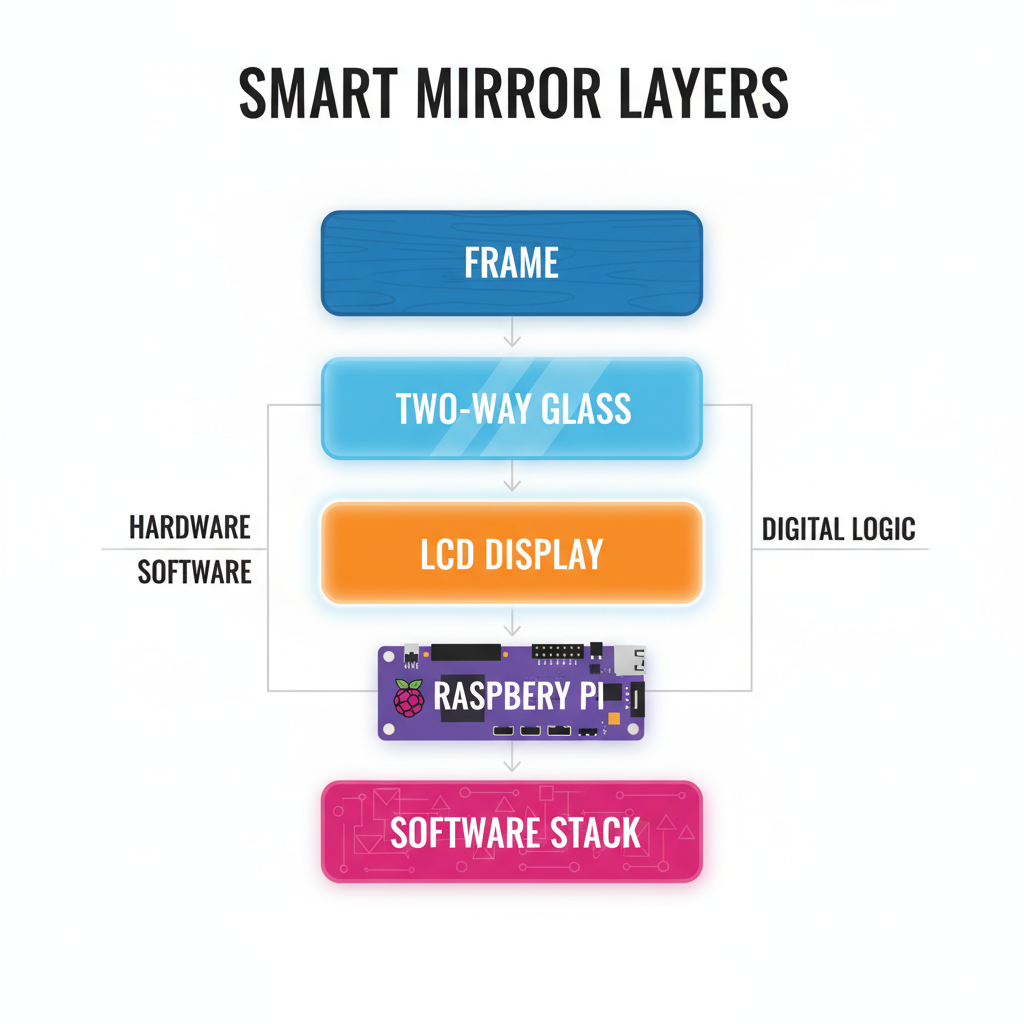
A smart mirror works by placing a monitor face-up behind a sheet of two-way mirror glass or film. The glass lets light pass both ways — so you see your reflection and the screen behind it at the same time. The software controls what gets displayed on that screen.
The idea has been around for years, yet it still feels a little like science fiction when you see one working in a hallway or bathroom.
The good news: building one has never been easier. Modern low-voltage USB-C monitors have replaced the bulky, high-voltage displays of early DIY builds. And open-source platforms like MagicMirror² — voted number one in the Raspberry Pi community’s MagPi Top 50 — have made the software side far more accessible than it used to be.
This guide walks you through everything: hardware, software installation, configuration, and customization — across every major platform and operating system.
Understanding Smart Mirror Hardware and Software
Building a smart mirror is a rewarding weekend project, but it requires a careful marriage of physical components and digital logic. Think of the hardware as the body and the smart mirror software as the brain.
How Smart Mirror Software Powers Your Display
Most modern smart mirror platforms, especially the industry-leading MagicMirror², are built using an Electron wrapper. If you aren’t a developer, don’t let that scare you! Electron essentially allows a web application (built with HTML, CSS, and JavaScript) to run as a standalone desktop app.
This is brilliant for us because it means we can use the same technologies that power the internet to design our mirror’s interface. The software typically runs in a Node.js environment, which handles the “back-end” tasks like fetching weather data from an API or checking your Google Calendar. For a deeper dive into the technical side, check out our smart-mirror-javascript-setup guide.
Essential Hardware Components for Beginners
Before you can install the software, you need something to run it on. Here is our recommended shopping list for a “super-slim” build:
- The Brain: A Raspberry Pi is the gold standard. The Raspberry Pi 4 offers the best performance, but the Raspberry Pi 3A+ is a fantastic choice for slim builds because it lacks the bulky Ethernet port and double-stack USB ports.
- The Display: Look for a monitor with at least 300 nits of brightness. This ensures the text is visible through the two-way mirror. Many makers now use 15.6-inch 1080p USB-C powered monitors because they are incredibly thin and don’t require high-voltage power bricks.
- The Mirror: You have two choices—two-way glass or two-way film. Glass looks more professional and provides a clearer reflection, while film is a budget-friendly way to convert existing acrylic or glass.
- Assembly Materials: You’ll need VHB (Very High Bond) mounting tape to secure the Pi and cables to the back of the monitor, and nylon spacers to prevent short-circuits.

When disassembling a monitor to make it “super-slim,” be careful! We suggest using a hairdryer to warm the adhesive on the plastic bezel before prying it off. Once the panel is bare, you can mount it directly against your two-way glass. For more on the initial setup, see our guide on smart-mirror-modules-installation.
Top Open Source Smart Mirror Software Platforms
While there are commercial options like SMART Mirror (often used in education), the DIY community thrives on open-source platforms. These give us total control over our data and our design.
| Feature | MagicMirror² | ReflectOS | Looking Glass |
|---|---|---|---|
| Primary Language | JavaScript (89%) | TypeScript / Web App | Go (60%) |
| GitHub Stars | 23,400+ | Growing | 10+ |
| License | MIT | Open Source | MIT |
| Main Strength | Massive module library | Easiest web configuration | High performance (WASM) |
MagicMirror²: The Industry Standard
If you want the “safe” choice with the most support, this is it. magicmirror v2.34.0 is the latest stable release as of 2026, featuring a modular architecture that allows you to “plug and play” different features.
The core software is maintained by a dedicated group of enthusiasts (including MichMich and sdetweil) and has over 310 contributors. Its biggest selling point is the community forum where thousands of users share their custom CSS and troubleshooting tips. You can learn how to make it your own in our customize-magicmirror-ui tutorial.
ReflectOS and Looking Glass Alternatives
If you find the terminal-heavy setup of MagicMirror² intimidating, ReflectOS is a breath of fresh air. It is designed to be “approachable.” Instead of editing code files, you use a web app to drag and drop sections on your dashboard. It’s perfect for projects like putting a screen on your fridge.
On the other end of the spectrum is Looking Glass. Written in Go and leveraging WebAssembly (WASM), it’s built for performance and extensibility. It’s a developer’s playground where modules can be written in almost any language and hot-reloaded without restarting the whole system.
Step-by-Step Installation and Configuration
Ready to get your hands dirty? We’ll focus on the Raspberry Pi installation, as it’s the most common path.
Configuring Your Smart Mirror Software for the First Time
For MagicMirror², the easiest way to install is the automated bash script. Open your terminal on a fresh install of Raspberry Pi OS (Full version is recommended) and run:
bash -c "$(curl -sL https://raw.githubusercontent.com/MichMich/MagicMirror/master/installers/raspberry.sh)"
Once installed, your primary workspace is the config/config.js file. This is where you define:
- Port and Address: Set
address: "0.0.0.0"if you want to access the mirror’s display from another computer on your network. - IP Whitelist: For security, ensure your local IP range is whitelisted so only you can access the server.
- Modules: This is an array where you list the widgets you want to show (Clock, Calendar, Weather, etc.) and their positions (e.g.,
top_right).
For more details on connecting your mirror to the outside world, see smart-mirror-api-integration.
Achieving Kiosk Mode and Automatic Startup
A true smart mirror should feel like an appliance, not a computer. You don’t want to see a desktop or a mouse cursor when you plug it in.
- PM2: We use the PM2 process manager to ensure the smart mirror software starts automatically on boot and restarts if it ever crashes.
- Display Rotation: If you mounted your monitor vertically (portrait), you’ll need to rotate the output. On newer Raspberry Pi OS versions using Wayfire, you edit
.config/wayfire.iniand addtransform = 90. - Kiosk Mode: This hides the mouse cursor and prevents the screen from going to sleep.
Learn the specific commands for this in our smart-mirror-javascript-setup-2 guide.
Advanced Customization: Modules and APIs
Once the basics are running, it’s time to make your mirror truly “smart.” This is where the 23,000+ GitHub stars for MagicMirror² really show their value; there is a module for almost everything.
Integrating Voice and Vision Features
Why touch a mirror and leave smudges when you can talk to it? By using the modular API, we can integrate:
- Voice Assistants: Use modules for Google Assistant or Alexa to control your smart home from the bathroom. Check out smart-mirror-voice-assistant-coding for the setup.
- Facial Recognition: Using a small camera hidden behind the glass, the mirror can identify who is standing in front of it and show a personalized calendar or “Good Morning” message. See our smart-mirror-facial-recognition-code to get started.
- Gesture Control: Infrared sensors can allow you to “swipe” through news feeds without touching the glass.
Developing Custom Smart Mirror Software Widgets
If you can’t find the module you need, you can build it. Because the core is JavaScript, anyone with basic web skills can create a widget. You’ll typically use Nunjucks templates for the HTML structure and CSS for the styling.
We recommend following our magic-mirror-coding-guide to learn how to fetch JSON data from a custom API and display it beautifully. Whether it’s your local bus schedule or your crypto portfolio, the possibilities are endless. You can even create smart-mirror-custom-widgets for specific niche hobbies.
Frequently Asked Questions about Smart Mirror Software
What is the best Raspberry Pi model for a smart mirror?
We recommend the Raspberry Pi 4 (2GB or 4GB) for most users. It has the processing power to handle heavy modules like facial recognition or video streaming without lag. However, if you are building a “super-slim” mirror, the Raspberry Pi 3A+ is the community favorite due to its low profile.
The Raspberry Pi Zero can run MagicMirror² in “server-only” mode, but it often struggles to render the actual graphics smoothly. For performance benchmarks and API tips, visit smart-mirror-api-integration-2.
Can I run smart mirror software on Windows or Linux?
Yes! Because MagicMirror² is built on Electron, it is cross-platform. While most people use Raspberry Pi (Linux), you can absolutely run it on an old Windows laptop tucked behind a large mirror. In fact, some users prefer Windows for easier integration of certain voice command software.
If you are using Windows, you might find our smart-mirror-gesture-control-coding guide helpful for setting up alternative inputs.
How do I add third-party modules to my mirror?
It’s a simple three-step process:
- Navigate to your
MagicMirror/modulesfolder in the terminal. - Use
git clone [URL of the module]to download it. - Enter the new module’s folder and run
npm installto grab its dependencies.
After that, just add the module’s name and your desired settings to your config.js file. For a step-by-step walkthrough, see smart-mirror-gesture-control-coding-2.
Conclusion
At Foco Finanças, we believe that the best technology is the kind you build yourself. Choosing the right smart mirror software is the first step toward creating a piece of functional art that organizes your life and impresses your guests.
Whether you choose the massive ecosystem of MagicMirror², the simplicity of ReflectOS, or the technical depth of Looking Glass, you are joining a global community of makers. The “sci-fi” future is already here—it’s just waiting for you to flash an SD card and turn it on.
Ready to dive deeper into the code? Explore our more coding tutorials or start your smart mirror project today by following our hardware assembly guides. Happy building!
